


My Best Colors
4.191.00 Reviews
App Specs
- Version
- 10.8.1
- Updated On
- License
- Free
- Downloads
- 1,000,000+
- Developer
- colorwise.me
- Categories
- Beauty
- Platform
- Android, iOS
Screenshots
 Analysis by AppCompare
I share a wardrobe with my partner in the practical sense that we often borrow jackets, compare outfit ideas, and try to avoid buying nearly identical colors. When we’re both getting ready in a hurry, a color reference can be more useful than another round of “does this go with that?” My Best Colors is designed around personal color guidance, so it makes most sense as a tool each person consults for their own choices—not as a household organizer or a shared style account.
That distinction matters if several people use the same phone or tablet. A palette based on one person’s appearance won’t automatically answer another person’s question, and color advice is personal rather than a universal family rule. I’d treat each result as a starting point for conversation, not as a verdict on what anyone is allowed to wear or buy.
One phone, several people, different palettes
A realistic use for a shared device is a weekend shopping trip: one person checks a color idea at home, then passes the phone to someone else who wants to explore their own preferences. The useful part is that the app can help turn a vague choice into something concrete—such as comparing a shirt with a few candidate colors—without requiring everyone to have the same taste.
I wouldn’t assume that a shared device means shared personal results, though. Before saving anything, it’s sensible to make clear whose palette or project is being viewed. If you use the app around other people, pause before sharing a screen or a saved image; personal style feedback can feel more revealing than a simple color chart, even when the subject is low-stakes.
Set expectations before relying on the analysis
Color analysis is affected by the conditions in which a photo is taken. For a more useful comparison, I’d use steady, natural-looking light, avoid strong colored lighting, and keep makeup or filters from changing how skin and hair appear. Then I’d check whether the suggested palette still feels right when I compare it with clothes I already know I enjoy wearing.
This is a practical boundary, not a reason to dismiss the app: a phone-based result can guide experimentation, but it should not overrule comfort, personal taste, or how a color looks in real life. If the lighting is poor or a photo has a strong filter, I’d retake it rather than treating the first recommendation as definitive. For a household, agreeing on that modest expectation helps keep the tool fun rather than turning it into a debate about who has the “correct” colors.
Coordinate projects without making everyone match
For a family event, shared palette ideas can help with invitations, decorations, or choosing a general direction for outfits. I’d use the app to collect a few shades that work well together, then let each person choose the garment or detail they actually like. That approach keeps coordination useful without demanding identical clothes or forcing a child into a color they dislike.
Worth Reading Before You Choose

EA SPORTS FC Mobile 26 Is a Bigger Football Game, but It Takes Time

Flipboard Shows What News Apps Must Do Beyond the Feed

Switching to Android Auto Means Rethinking Your Driving Routine

Google Calendar Makes a Crowded Week Easier to Manage

Ludo King Makes the Most of the Minutes Between Plans

Baby Panda World Brings Quick Play to Modern Phones, but Its Game Library Feels Busy
The same principle works for home decisions. A person who likes the app’s color suggestions can bring a palette into a discussion about a room, while the household checks it against existing furniture, lighting, and the colors everyone is willing to live with. A phone display is a handy reference, not a reliable substitute for seeing a paint or fabric sample in the room.
Age, privacy, and a sensible level of trust
The app is rated for Everyone, which makes its subject matter approachable across ages, but I’d still guide younger users when they take or share photos. The app’s color advice is about appearance and creative choices; it shouldn’t be used to rank people, tease them, or tell them that certain colors are off-limits. A supportive adult can frame recommendations as ideas to try rather than rules to follow.
My household advice is simple: keep control of who uses the device, check what is being shared before posting a palette, and don’t treat an app result as a measure of someone’s worth or attractiveness. Those are good habits for any creative app, especially one that invites people to think about their appearance. If a user wants only broad color inspiration and doesn’t want appearance-based guidance, a basic palette or photo color-picker tool may feel more comfortable.
Ever had that moment when you're staring at your closet, trying to figure out what color combination will make you look like you just stepped out of a fashion magazine? Or maybe you're redecorating your room and can't decide whether that mint green is the right shade for your walls? Enter the world of My Best Colors, an app that's here to be your color-savvy best friend.
Discovering Your Palette
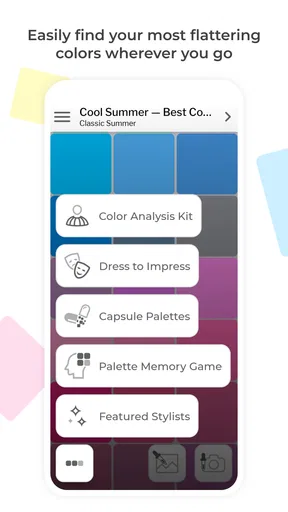
The first thing that caught my eye about My Best Colors is its user-friendly interface. After a quick download, I was greeted with a simple yet engaging design that made navigation a breeze. No need to be a tech wizard here; it's like the app just gets you.
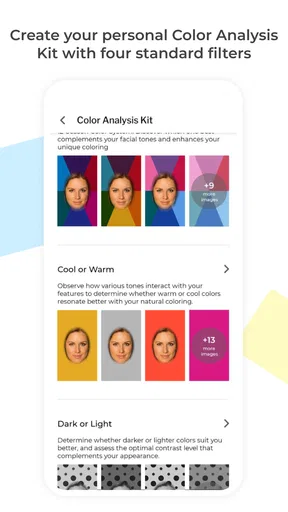
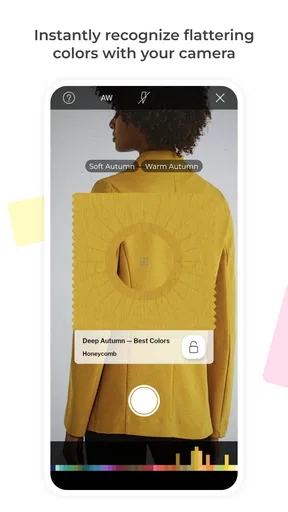
Once you're in, the app offers a personalized color analysis. Yep, you heard that right. It helps you discover which colors complement your skin tone, eye color, and hair tone. It’s like having a personal stylist in your pocket, which is pretty neat if you ask me.
Color Matching Made Easy
One of the standout features is the color matching tool. Have a favorite shirt but not sure what pants to wear with it? Snap a picture, and the app suggests the best matches. It's a game-changer for those of us who need a little help in the style department.
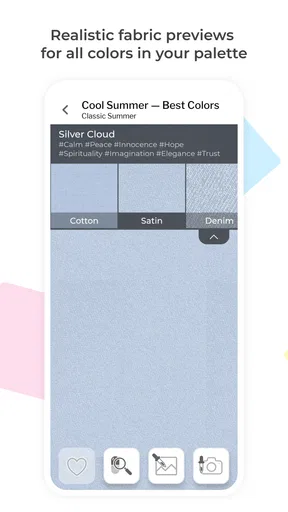
And let's talk about the variety. The app boasts a comprehensive color library, so whether you're into bold and bright or subtle and sophisticated, there's something for everyone. It's like a candy store for color enthusiasts.
Beyond Fashion
But wait, there's more! My Best Colors isn't just for fashion lovers. Home decorators, rejoice! The app offers suggestions for interior design, helping you create a harmonious space that reflects your personality. Whether you're going for a cozy vibe or a modern feel, the app's got your back.
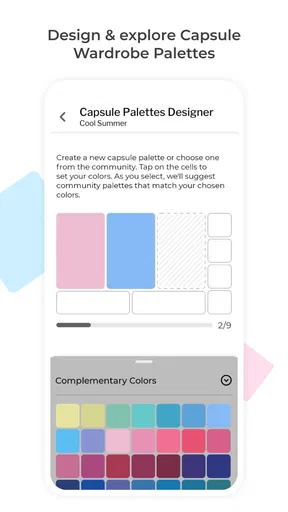
I found the ability to save and organize my favorite color palettes particularly handy. Planning a wedding or a big event? You can create and save multiple palettes, ensuring everything from the invites to the table settings is color-coordinated to perfection.
Smart Features for the Creative Mind
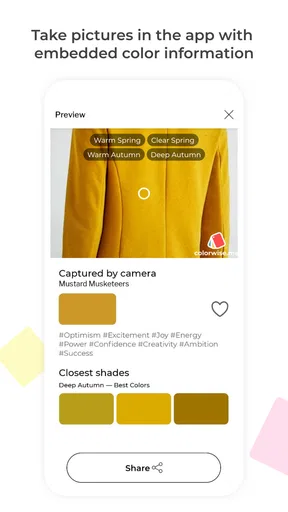
For the creative minds out there, the app's color picker tool is a dream. You can extract colors from any photo, allowing endless inspiration for your next project. Plus, the app provides detailed color information, including HEX and RGB codes, perfect for graphic designers and digital artists.
And if you're into sharing, the app makes it easy to flaunt your color expertise with friends and family. Share your palettes on social media and get feedback. Who knows, you might just become the go-to color guru in your circle.
What to expect from the recommendations
The most useful question for a new user is whether the palette should be treated as a rulebook. I don’t think so. I’d use the analysis to narrow down options, then make the final call by checking the color in daylight and against pieces already in my wardrobe. A suggestion can be helpful even when I ultimately choose a shade outside it; it gives me a comparison point rather than a command.
That workflow also makes the app more practical for people who are unsure where to start. Instead of replacing a closet with a new set of “approved” colors, try one low-commitment item—an accessory, scarf, or top—and see how often you reach for it. If the recommendation feels awkward or unlike your style, there is little reason to force it. The best result is a more confident choice, not a stricter set of shopping rules.
Use photos as references, not color standards
The photo tools have different jobs, and it helps to keep them separate. A personal color analysis is about exploring shades in relation to appearance; extracting colors from a photo is a way to capture visual inspiration. A photograph of a favorite room, fabric, or landscape can give you a palette to explore, but the colors on a screen may not match the physical objects exactly.
For design work, I’d use the HEX and RGB details as convenient digital references, then check the result in the program or device where the project will actually appear. For decorating, I’d take the suggested combination as a shortlist and compare real samples at home. This extra check is especially worthwhile when a large surface is involved: a shade that looks calm on a small screen can feel much stronger across a whole wall.
Where it fits among color apps
Compared with the usual alternatives, this app covers several related needs in one place: personal palette discovery, matching colors, saving combinations, and drawing inspiration from photos. A simple color-picker app may be quicker if all you need is a HEX value, while a conventional mood-board tool may suit a project that depends on collecting lots of images and notes. A human stylist or in-person color consultation is a better fit when you want detailed, tailored discussion rather than app-based guidance.
I see the main trade-off as convenience versus certainty. The app is easy to consult when you’re deciding what to wear or gathering ideas, but a phone screen and a quick photo can’t reproduce every lighting condition or fabric texture. It’s strongest as a low-pressure companion for trying combinations, not as a final authority on clothing, paint, or design.
Who will get the most from it
I’d recommend it to someone who enjoys experimenting with clothes, wants a nudge when matching colors, or likes turning a photo into a usable palette. It can also help a creative person keep color references together instead of relying on memory. For someone who already has a strong personal style and prefers choosing by instinct, the analysis may be less valuable; the photo picker and palette tools are likely to be the more relevant parts.
I’d skip it if you’re looking for a complete wardrobe planner, a shopping service, or professional design software. Its appeal is color guidance and inspiration, not managing every part of getting dressed or completing a renovation. Likewise, if appearance-based suggestions make you uncomfortable, a general-purpose color picker can offer a more neutral way to explore shades without making the process about skin, eyes, or hair.
Price, platform, and household fit
As a beauty app from colorwise.me, it’s free to download, with optional in-app purchases priced from $9.99 to $14.99 per item. I’d begin with the free experience and decide whether the tools I actually use justify paying for anything; there’s no need to buy into every option just to test whether color guidance suits you. Its 4.1 average from around 3,100 ratings and more than a million installs suggest it has found an audience, though those figures can’t tell you whether its particular approach will match your taste.
The app is rated for Everyone, was released on September 21, 2017, and its current version is 10.8.0, with Android 6.0 as the minimum operating-system requirement. For a household, that makes the device check straightforward on Android, but the age rating should not replace ordinary judgment about photos and sharing. I’d also keep expectations clear on a shared phone: use the app together for ideas if that suits everyone, but don’t assume it provides separate household profiles or automatically keeps one person’s results apart from another’s.
Final Thoughts
In a nutshell, My Best Colors is a versatile app that goes beyond just picking pretty shades. It’s about enhancing your lifestyle, whether through fashion, home decor, or creative projects.
The app's ability to tailor recommendations based on personal features is a standout, making it a must-have tool for anyone looking to elevate their color game. So, if you're ready to explore the world in vibrant hues, give it a whirl. You might just find your new favorite shade!
For a household, my verdict is that it’s best treated as a shared source of inspiration rather than a shared identity or rulebook. Let each person decide which suggestions feel useful, verify important color choices outside the screen, and keep photo sharing intentional. If you approach it that way, it can make everyday outfit decisions and creative projects more playful without asking everyone at home to dress, decorate, or think alike.
Pros
- User-friendly interface for easy navigation.
- Extensive color palette options available.
- Customizable color combinations feature.
- Seamless integration with design apps.
- Regular updates with new color trends.
Cons
- Limited free features; premium required.
- Occasional lag on older devices.
- Ads can be intrusive at times.
- Requires internet for full functionality.
- No offline color matching tool.
FAQs for My Best Colors
What is My Best Colors and how does it work?
My Best Colors is an app designed to help users discover their ideal color palettes for fashion, interior design, and more. By analyzing your personal preferences and providing a detailed color profile, the app offers tailored recommendations. Users can upload photos, explore trending palettes, and even shop for items that match their unique color scheme.
Is My Best Colors available for both Android and iOS devices?
Yes, My Best Colors is available for download on both Android and iOS platforms. Users can easily find the app in the Google Play Store for Android devices and the Apple App Store for iOS devices. Ensure your device meets the system requirements for optimal performance.
Does My Best Colors require an internet connection to function?
While some features of My Best Colors, such as downloading new palettes or accessing the shop, require an internet connection, the app also offers offline capabilities. Users can view saved palettes and use basic features without being connected to the internet, making it versatile for on-the-go use.
Are there any in-app purchases or subscription fees associated with My Best Colors?
My Best Colors offers a free version with basic features and optional in-app purchases for advanced functionality. Users can choose to subscribe for premium features like exclusive color palettes, ad-free experience, and additional customization options. The subscription is available on a monthly or yearly basis.
How does My Best Colors ensure user privacy and data security?
My Best Colors is committed to protecting user privacy and data security. The app adheres to strict privacy policies, ensuring that personal information is not shared with third parties without consent. Data is encrypted and stored securely, giving users peace of mind while using the app.


